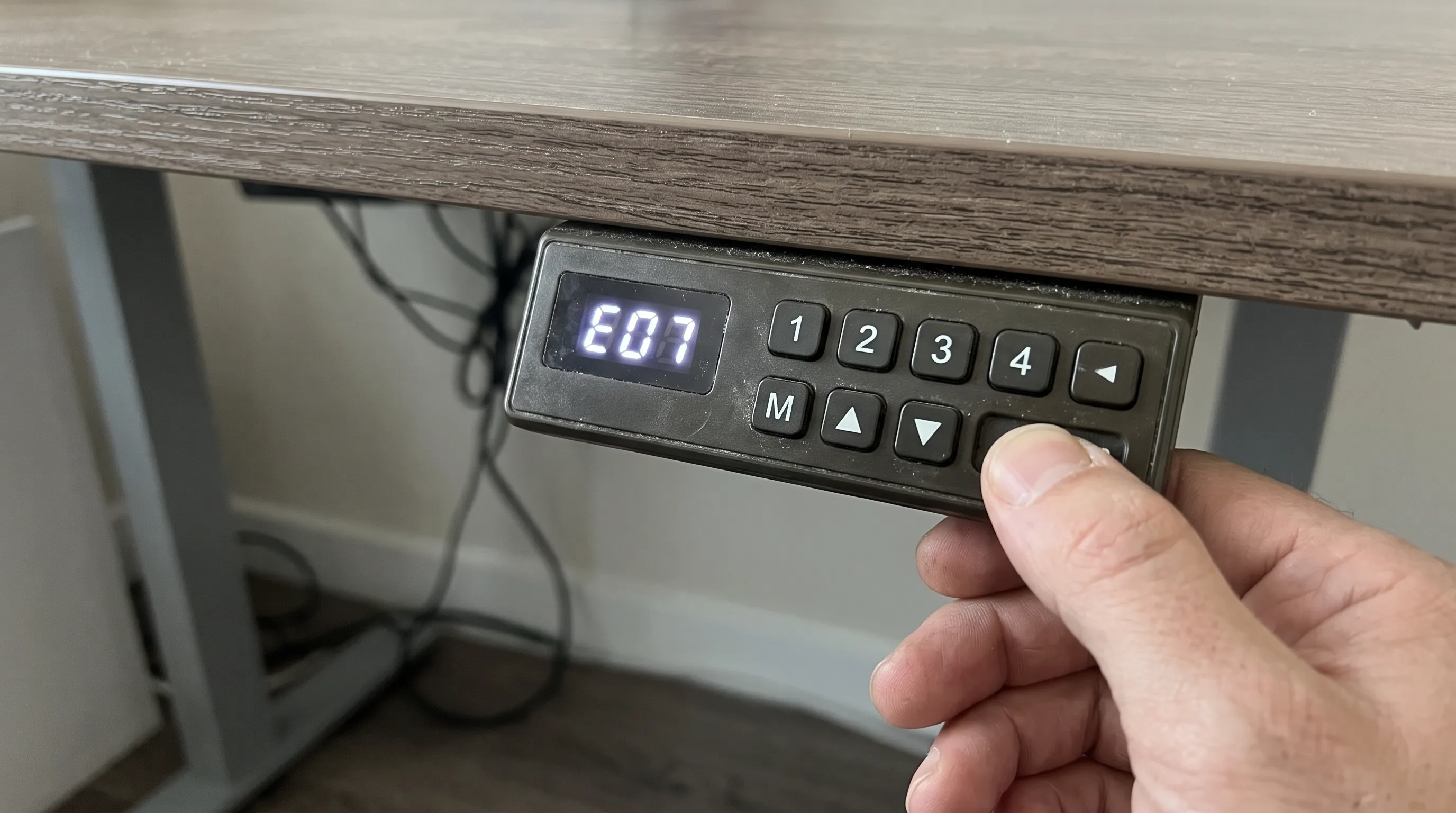
Short Answer: Most error codes can be reset by lowering your desk to the lowest setting and pressing the DOWN button until it lowers a little, comes back up a little and then stops. According to UPLIFT around 70% of the control boxes they get back are not faulty and can be fixed with this reset. Overheat codes need 15-25 mins rest. Overload codes (often E03/E04) means you should take weights off. This error code can mean different things for different brands so below is a list of what each may mean for your brand.
Before You Reset: A 60-Second Check
Resetting returns your desk to the lowest position.
Ensure there is nothing underneath the desk that can be damaged or caught. This can include chairs, drawers, footrests and cables.
Ensure that the power cable is fully plugged into the control box and wall.
Ensure all cables are connected properly. This includes leg cables and keypad cable. Loose connections often cause many mysterious errors.
Ensure nothing is touching the desktop or frame. This will activate the anti-collision feature.
If you have recently added new monitors, arms or equipment, you may be exceeding the weight limit.
If you have moved the desk up and down several times in a short period of time this can cause a thermal lockout.
If none of these apply then perform a reset.
How to Reset a Standing Desk
The instructions will vary slightly depending on the brand you have, if your instructions differ to these please follow your manual. These instructions should cover most electrical desks.
Method 1: The Hold-Down Reset (UPLIFT's Documented Steps)
-
Clear area under desk.
-
Hold down the DOWN button for around 10 seconds. The keypad with screen will display ASr to show it is ready to be reset (advanced paddle keypad will display RESET). Let go.
-
Hold down the DOWN button again until the desk moves down slightly, then up slightly and stops. If it doesn’t move repeat this step.
-
Test desk by moving up and down.
Method 2: The Unplug-and-Hold Reset
Many brands suggest doing a power cycle.
Lower your desk to the lowest point possible.
Unplug the power cable. Wait anywhere between 10-30 seconds up to a minute. If your manual mentions a time, use that.
Plug your desk back in.
Hold the DOWN button down until your desk reaches the lowest point and bounces back a little. You may hear a beep and see RST, ASr or a dash on your display.
Let go of the button and try using your desk as usual.
This resets the desk and it will re-calibrate the position. This will also clear most faults. The desk should be reset which many brands refer to as RST or ASr. You may see this whilst resetting.
Why the Same Code Means Different Things
This is the most important thing to know and something most error code lists will miss out. There are only a few manufacturers of standing desk controllers and so there are many brands using them. Each brand will have their own documentation explaining what each error code means. The codes can also vary depending on the model. For example, E02 has been documented as an overuse/overheating error by FlexiSpot, a table leg error by some current Vari models, a motor overuse error by older Vari models and as part of a firmware/connection group by an UPLIFT V2.
Don’t take these generic codes at face value. Use the table below to see what brands have documented and check it against your own manual/support page.
What Brands Document
| Code | Vari (panel codes) | FlexiSpot (support articles and manuals) |
|---|---|---|
| E01 | Table-leg failure: reseat the leg cables, then reset | Varies by model: turn the desk off and retry, or a motor or control box issue |
| E02 | Motor overuse on older desks (rest about 20 minutes); on newer models grouped with table-leg failure | Overuse or overheating: rest roughly 15–25 minutes |
| E03 | Overload: remove weight, then reset | Overload: check the load, then press the down button to reset |
| E04 | Data error: reset the control panel | Overload or obstruction on some models, or a handset connection issue |
| E05 | Stuck button: move the button back and forth to free it | Frame stuck or temperature protection, depending on the model |
| RST / ASr | Reset state: complete the reset | Reset needed: hold the down button until it completes |
Below is a table of paraphrased information from manufacturers panel codes pages, support articles and manuals. This will vary based on your model and year. Be sure to refer to your manual. If your brand is not listed, search for their panel codes page/troubleshooting page or contact support with your model number and code.
Error Code Groups: What They Usually Mean and What to Do
Rather than memorizing codes, it helps to know the typical groups of problems.
1. Overheating or Overuse (Often E01, E02 or "HOT")
What it means: The motors have been used for too long. The motors on standing desks are not designed to run continuously. As an example, Vari will lockout after around 2 minutes of continuous use.
What to do: Stop moving the desk. Wait between 15 and 25 minutes (depending on the brand). Plug/unplug according to your manual. Try again. This can often be caused by trying out your new desk, so you run it up and down multiple times.
2. Overload (Often E03 or E04)
Meaning: The desk is overloaded or there is something holding the desk down.
Solution: Remove any excess weight from the desktop. This should be done by removing the monitor arms and any heavy equipment first. Then ensure nothing is holding the frame down. If the desk is within the load capacity but the code still appears then it is more likely to be an issue with the motor/controller.
3. Obstruction or Anti-Collision Triggered
This means that your desk is thinking it has hit something and has stopped to protect itself. This could be because there is an actual obstruction or because the sensitivity is too high.
To fix this make sure there is nothing above or below the desk. Check that the legs are moving freely. Reset the desk. Some brands have adjustable collision sensitivity in their manual.
4. Cable or Connection Problems (Leg, Motor or Keypad Cables)
Problem
The connector is loose, twisted or broken meaning that the controller cannot talk to the motor/keypad.
Solution
Switch the power off. Remove and re-insert all cables between the control box, legs and keypad firmly. Check for twisted pins and squashed wires. Reset.
5. Position Mismatch or Sync Problems
Meaning: The desk legs are not in sync. The desk could be tilting or not moving.
Solution: Run the reset to re-calibrate the desk legs. If the problem continues then the issue is likely to be an issue with the motors/sensors.
6. Stuck Button
What's happening: The controller thinks a button is being held down.
Solution: Tap each button on and off to release them. If they are still stuck then you may need to replace the keypad.
Common Symptoms Without a Code
Desk does not go down (or will not go up). Often this is due to a partial reset. Perform a full reset whilst holding the button DOWN.
Desk is stuck at lowest point. This can be due to a protection or reset. Remove any obstructions and perform a full reset.
Memory presets have stopped working. Memory heights may need saving after a reset or power cut. If you have changed any height limits then they may be outside the new limits. Save your positions.
Beeping but no movement. Often this is due to a protection or loose connection. Check your cables and reset.
No display. Check your power lead and power socket. Then check your keypad lead. If there is still no display then please contact support with your model number.
Desk is tilting or uneven. Legs are out of sync. Perform a reset. If it continues to tilt then a leg motor/sensor may need servicing.
What to Do If the Reset Doesn't Work
If you've done all of the above and your code is still appearing then it's likely that one of the components is faulty.
| Failing part | Typical signs | Usual fix |
|---|---|---|
| Motor | One leg won't move, grinding or clicking | Replace the motor |
| Control box | No response, repeated errors after resets | Replace the control box |
| Keypad | Stuck or unresponsive buttons, errors that follow the keypad | Replace the keypad |
Before buying parts:
-
Check your warranty. Many frames and motors come with a multi-year warranty so you may be able to get a faulty part replaced for free.
-
Contact the manufacturer. Provide them with your model number, exact error code and what you've tried.
-
Consider repairing. A repair guide estimates the cost of a motor at around $80-$150, a control box at around $100-$200 and a keypad at around $40-$80. These are only estimates from one source so contact the manufacturer to check. Usually it makes sense to repair a premium desk but if your desk is very cheap and out of warranty then the cost of parts can exceed the value of the desk.
How to Prevent Error Codes
- Respect the duty cycle. Move the desk only as needed, and avoid running it up and down repeatedly.
- Stay within the weight limit. Include monitor arms, monitors, towers and accessories. See our electric standing desk guide for capacity by motor type.
- Keep cables slack and protected. Route them so they can't be pinched or pulled at full height.
- Keep the area clear. Don't store items under or against the desk.
- Avoid unplugging mid-movement. Power loss can leave the desk needing a reset.
- Tighten hardware occasionally, because a loose frame can cause binding and stability issues. See our standing desk wobble guide once published, or our standing desk guide.
A Note for Riser Desk Owners
Most riser desks (converters) are not electronic they have either a gas spring or manual lift, so there are no error codes. If your gas spring riser is not rising correctly, see how riser desks work. Electric converters do have control boxes, and the same reset logic often applies, but follow the manufacturer's instructions.
Not sure whether an electric or manual desk suits you? See electric vs manual standing desks.
Frequently Asked Questions
How do I reset my standing desk?
Ensure that there is nothing underneath the desk. Press and hold the DOWN button until the desk descends to its lowest position and rises back up slightly. Some brands will require you to unplug the table for between 30-60 seconds. Refer to the steps in your manual for the correct procedure. Different brands will have different procedures.
What does error code E01 mean on a standing desk?
This can depend on the brand/model. Some Vari desks have noted this as a table leg issue, some FlexiSpot articles have noted this as overheating/overuse, and some FlexiSpot manuals have noted this as a motor/control box issue. You should check with the manufacturer's site for the exact meaning of this error.
What does E02 mean on a standing desk?
Often it is due to overuse or overheating (take a break of around 15-25 mins). It can also be due to an issue with the legs or connections on other models. Refer to your brand documentation.
What do E03 and E04 mean?
Usually indicates an overload or blockage. Take the weight off and clear any blockages from your desk. Reset. Some brands will give you an E04 error due to data issues or problems with the handset.
How long should I wait when my standing desk overheats?
Most brands recommend around 15-25 minutes. Vari states it should take 20 minutes after being locked out. FlexiSpot articles recommend between 15-25 minutes.
Why does my standing desk only go down?
They will generally be in a partial reset mode. Once you have reset you will need to hold down the button whilst the desk does a little up and down motion.
What does RST or ASr mean?
This means that your desk is in reset mode. This is normal during the reset process and usually resolves when you have completed the steps.
Is it worth repairing a standing desk with a motor or controller fault?
If your desk is a premium or in warranty then yes. If your desk is a budget one and is out of warranty then you may find that the parts required for repair cost more than the value of the desk. We recommend you compare the cost of repair and replacement.
This guide has been created using information from manufacturers panel code pages, support articles, user manuals (UPLIFT, Vari and FlexiSpot) and published repair guides. As different brands, models and years will have different error codes, we always recommend checking your own manual or contacting the manufacturer.
Part prices are estimated from one published source. This is general information and should not be used as a replacement for manufacturer support. This guide contains affiliate links, however if we earn a commission this will not affect our recommendations.